The contract was ready to send — except the date was last year’s
The services agreement was signed, scanned and one tap from the client’s inbox. Then I saw it: the date still said last year. Here’s how I fixed that one word on the page itself — no reprint, no desktop, no re-scan.
Every small operator knows the last-minute catch. Mine was a services agreement between us and Global Corp — the kind of two-pager you’ve read so many times your eyes skate over it. I’d printed it, signed it, scanned it back in, and was about to fire it off when something near the top snagged. ‘Date: January 1, 2026.’ I read it again. That was the template date. Nobody had ever changed it.
Old me would have groaned, reopened the original on a laptop somewhere, edited it, reprinted, re-signed and re-scanned the whole thing — half an hour gone over a single line. But the scan was already sitting in Docusy, and a scan in Docusy isn’t a flat picture. The text is live. So I just zoomed in and tapped the date.
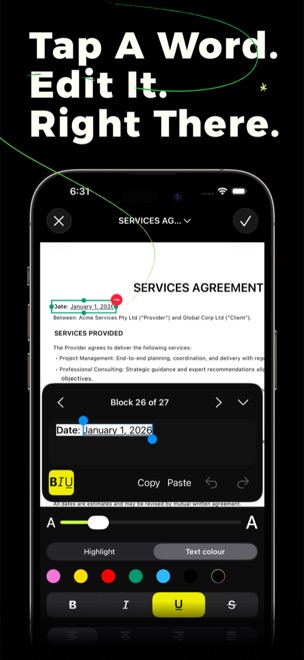
Three taps to fix a line
- Tap the word. Docusy had already read the whole page on the phone, so the date wasn’t an image — it was real text. I tapped the block and ‘Date: January 1, 2026’ lit up, ready to edit, like Live Text right on the page.
- Type the correction. I changed the date to the day we actually signed. Docusy steps through the page block by block — this one was 26 of 27 — so I could nudge forward and confirm nothing else was stale before I moved on.
- Match the styling. The original had that line subtly emphasised, so I kept it consistent — bold, underline and a highlight are all right there in the toolbar. The fixed line looked like it had always been part of the document.
The whole detour took under a minute. No laptop, no reprint, no second trip to the scanner — just tap, type, done. I sent the corrected agreement straight on to the client, and the next time I needed to lift a clause out for an email, I copied it from the scan in seconds instead of retyping it.
That’s the quiet trick of it: once a scan is real text, it stops being a dead end. You can fix it, search it, copy a clause out, or restyle a line — all on the page you’re already looking at.
Spotted a typo in a scan?
Docusy is free to download on iPhone, iPad & Mac. Next time a scanned document needs one small fix, you can do it right there on the page.