Mark up & redact
Highlight, underline and strike through recognised text, add lines, arrows, shapes and dated stamps — and truly black out anything sensitive, baked into the export.
A privacy-first document scanner for iPhone, iPad & Mac. Scan a document, tap any word, and change it — the edit matches the original font and colour, so it looks native, not pasted on. Everything runs on your device.
Version 5.2 · Released 10 July 2026 · Free to download

Press contact: armin.ahmadi@gmail.com
Docusy is the document scanner that edits what it reads. Most scanners hand you a locked image and stop there. Docusy reads every word in your scan and lets you change it — tap a word to correct, replace, or rewrite it, and the edit takes on your document’s own font and colour, so it looks native rather than pasted on. That one capability is the wedge: a scanner that edits, not just captures.
Around it sits the full toolkit. Scan with a rebuilt camera that detects the edges, corrects the perspective, and enhances the image — and now captures two-sided IDs and book spreads too. On-device reading makes every scan searchable and editable, with Live Text on the page. Mark it up — highlight, stamp, and truly redact — then summarise a page or have it read aloud, all on your device. Translate recognised text into any language your device supports, with the layout kept intact (iOS 18+). Pull the merchant, date, totals and line items off a receipt and export them as CSV. Export to PDF, JPG, PNG, CSV or plain text — and, on iOS 26, to Word and Excel, where detected tables become real rows.
Scan a receipt. Sign a tenancy agreement. Fix a typo in a form. Mark up a contract, black out the sensitive lines, then archive it. Lock it behind Face ID, and export an encrypted PDF when a document is sensitive. Docusy works in 17 languages, including full right-to-left layout for Arabic and Persian, across iPhone, iPad and Mac — with a redesigned scanner and, on bigger screens, a sidebar and editing toolbar. One purchase covers them all.
Everything runs on your device. No accounts. No servers. No internet required. No ads, no watermarks. We can’t see your documents because we never receive them. Made in Australia by WhiteLake.
Highlight, underline and strike through recognised text, add lines, arrows, shapes and dated stamps — and truly black out anything sensitive, baked into the export.
Summarise any page in a tap and have it read aloud — the summary is written on your device, free, and never uploaded. (Summary: iOS 26)
A faster, rebuilt camera adds two-sided ID capture, book-spread split, automatic shadow removal and an adaptive black-&-white mode.
An in-document find bar, semantic search across every scan, and the ability to move a page from one document to another.
Tell Docusy the one thing you came to do — edit text, sign, or extract a receipt — and your very first scan does exactly that.
Docusy now opens in a refined dark theme, with a System / Light / Dark switch in Settings.
Edge detection, perspective correction and image enhancement, automatically — plus two-sided ID capture and book-spread split.
On-device OCR turns every scan into real text. Tap a word to correct, replace or rewrite it — the edit matches the page.
Highlight, underline, stamp and add shapes — then truly black out anything sensitive, baked into the export so it can’t be recovered.
Summarise a page in a tap and have it read aloud — written on your device, free, and never uploaded. (Summary: iOS 26)
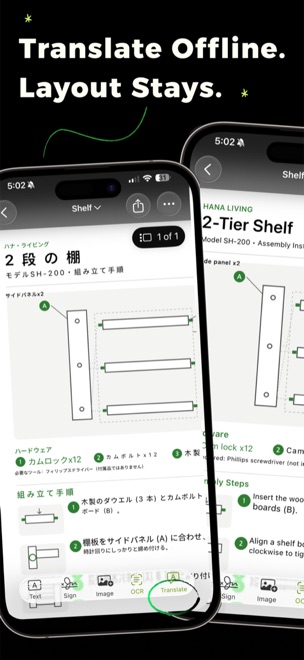
Translate recognised text into any language your device supports, layout intact. (iOS 18+)
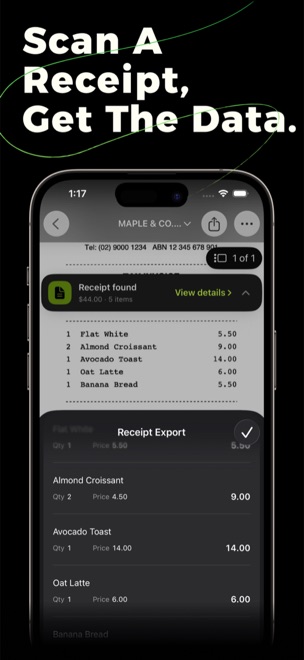
Detects merchant, date, totals and line items, and exports them as CSV — ready for expenses and bookkeeping.
Draw a signature once and reuse it; highlight, draw and add text anywhere.
Combine up to six PDFs into one, reorder pages with a drag, and keep projects tidy.
Save as PDF, JPG, PNG, CSV or plain text — or Word (.docx) and Excel (.xlsx) on iOS 26. Share, save to Files, add to Photos, or print.
Lock the app with Face ID or your passcode, export password-protected PDFs, and keep documents protected at rest.
An in-document find bar, plus semantic search across every scan — even offline. Spotlight searches your scanned PDFs and shows pages as thumbnails; pin the ones you use most.
One purchase covers iPhone, iPad and Mac, with a sidebar and redesigned toolbar on bigger screens. Siri, Shortcuts, Files share-sheet actions, and “Open with” from other apps.
High-resolution captures below. You’re welcome to shoot your own.
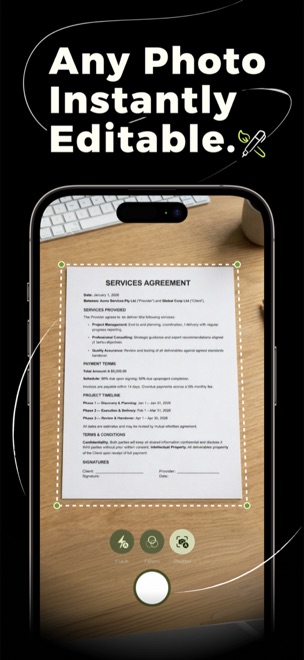
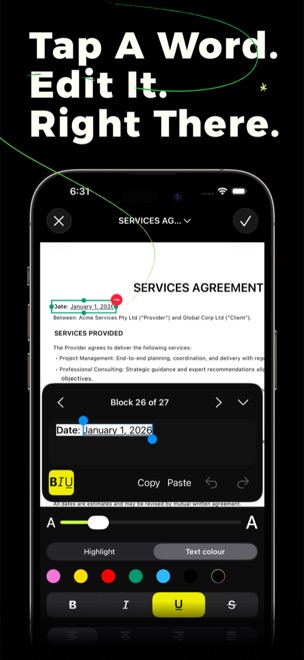
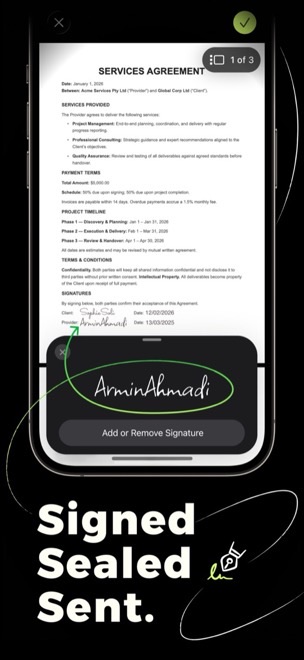
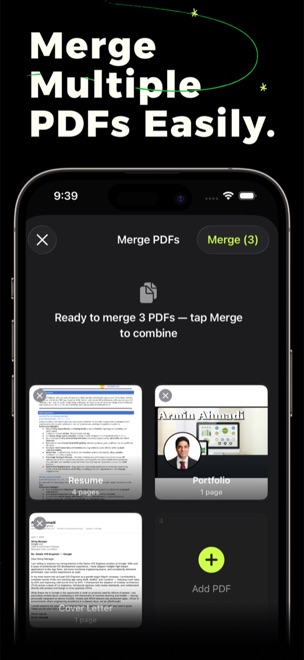
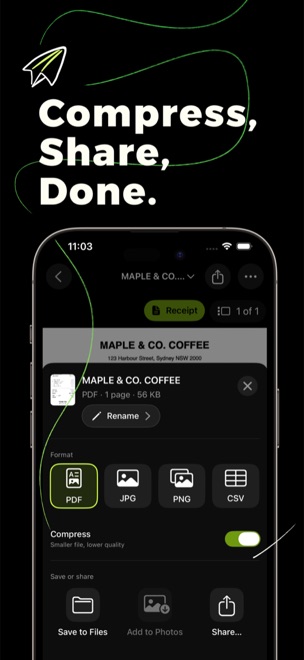
The wedge — “Docusy is the scanner that edits what it reads. Tap any word in a scan and change it — and the edit matches the original font and colour, so it looks native, not pasted on.”
Privacy — “Scanning, reading, data extraction, translation and the AI summary all run on your device. There are no accounts and no servers — your documents never leave your phone.”
Redaction — “Black out anything sensitive and it’s actually gone — Docusy bakes the redaction into the export, so what you removed can’t be recovered.”
On-device AI — “Ask Docusy to summarise a page and the summary is written on your device — free, cached, and it never leaves your phone. (iOS 26)”
Translation — “Translate a scanned document into any language your device supports, with the original layout kept intact — and nothing ever leaves your phone. (iOS 18+)”
Word / Excel export — “Export a scan to Word or Excel and the tables Docusy detects come through as real rows, not a flat picture. (iOS 26)”
Apple-native — “One purchase covers iPhone, iPad and Mac — with a redesigned sidebar and editing toolbar on bigger screens. Docusy handles documents the way Apple apps should.”
| App | Docusy: PDF Editor & Scanner |
| Developer | WhiteLake Pty Ltd (Australia) · ACN 642 302 887 |
| Category | Productivity — document scanner & PDF editor |
| Platforms | iPhone, iPad and Mac (Apple silicon) — one purchase covers every device |
| Requirements | iOS 17 or later. Translation requires iOS 18+. On-device AI page summaries, Word (.docx) and Excel (.xlsx) export require iOS 26. |
| Languages | 17, including full right-to-left layout for Arabic and Persian: Arabic, Chinese (Simplified & Traditional), Dutch, English, French, German, Hindi, Italian, Japanese, Korean, Persian, Portuguese, Russian, Spanish, Turkish, Ukrainian |
| Privacy | Everything runs on your device. No accounts, no servers, no internet required — your documents never leave your phone. |
| Price | Free to download. Some advanced features are part of an optional premium subscription, with a one-time All Access purchase. No ads. No watermarks. |
| Version | 5.2 — released 10 July 2026 |
| App Store | apps.apple.com/app/docusy-pdf-scanner-with-ocr/id1565135201 |
| Website | whitelake.com.au/docusy.html |
| Press contact | armin.ahmadi@gmail.com |
| Origin | Made in Australia |
Docusy needs no account and no sign-in — install it and start scanning. Nothing is gated behind a login because there’s no login to begin with.
Docusy is free to download on the App Store. Promo and offer codes for the premium features are available on request — email armin.ahmadi@gmail.com and we’ll send some over. A TestFlight build is available on request if you’d like to try upcoming features early.
A few things worth trying first, because they show what makes Docusy different:
We’d genuinely value honest feedback — cons included. If something feels slow, confusing or half-finished, tell us; that’s more useful than praise. No conditions attached: it’s not in exchange for coverage. And you’re welcome to shoot your own screenshots.
10 July 2026
Markup & redaction, on-device document AI (page summaries + read-aloud), a redesigned scanner, and a personalised first run. Read release →
22 June 2026
Word & Excel export, document protection (app lock + encrypted PDFs), and translation into any language. Read release →
10 June 2026
Smart data extraction to CSV, on-device translation, editable recognised text, and a redesigned export sheet. Read release →
WhiteLake is an independent Australian software studio building thoughtful, privacy-first apps for iPhone, iPad and Mac. We make tools that do real work without asking you to hand over your data — everything runs on your device, with no accounts and no servers. We build a small number of apps, carefully. Docusy is our flagship.
Questions, review codes, or anything else — we reply to every email.
armin.ahmadi@gmail.com