The job posting wanted one PDF. I had three.
The role closed at midnight and I was ready to apply — until the upload box said “one PDF only.” My resume, portfolio and cover letter were three separate files. Here’s how they became one tidy document, in the right order, without a desktop.
Everyone who’s job-hunting has the folder. Mine had three files that refused to behave: a four-page resume, a one-page cover letter I’d rewritten twice, and a one-page portfolio that was really just a headshot and a few links. The listing was clear — attach a single PDF. The form wouldn’t take three. And of course I’d left it to the last evening, sitting on the couch with the laptop already shut and charging in the other room.
I almost reopened the laptop, hunted for the file menu, and started the email-it-to-myself shuffle. Then I remembered Docusy was already on my phone. I opened it, found Merge PDFs, and started adding the pieces one at a time.
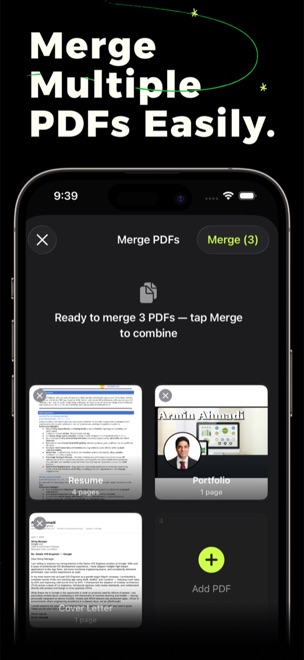
Three files into one
- Add the pieces. I tapped Add PDF and pulled in all three — the resume, the portfolio and the cover letter. Docusy lined them up as a queue, page counts and all: four pages, one, one.
- Drag into order. They needed reshuffling, so I dragged the cover letter to the front where a reader expects it, then the resume, then the portfolio. A quick drag and the order finally read like an application.
- Tap Merge. The button showed Merge (3). One tap and the three files folded into a single multi-page PDF — no gaps, no stray covers, nothing left over.
One document, correctly ordered, ready to go. I shared it straight from Docusy into the application form, watched the upload bar fill, and hit submit with a few minutes to spare. The folder of stray files could stay where it was — what mattered was already one clean PDF.
Got files that should be one?
Docusy is free to download on iPhone, iPad & Mac. Next time a form wants a single PDF, the fix is already in your pocket.