How I cleared a month of receipts before my coffee went cold
Tax time was three days away and my “filing system” was a glovebox stuffed with curling thermal paper. Here’s how the whole pile became one tidy spreadsheet — without a scanner, a desktop, or a single upload.
Every freelancer has the drawer. Mine was the glovebox: petrol receipts, a hardware-store run, two client lunches, the parking that somehow costs more than the lunch. Once a year it all has to become numbers in a spreadsheet — and every year I’d put it off until the night before, squinting at faded totals, typing them in one at a time, hoping I hadn’t dropped a digit.
This time I was at the café around the corner, flat white in hand, quietly dreading the evening ahead. I’d installed Docusy the week before to scan a rental lease, and it hadn’t occurred to me to use it for this. On a whim, I pulled the first receipt off the top of the pile and pointed my phone at it.
Three taps a receipt
- Point and capture. Docusy found the edges of the receipt on the café table, straightened it out, and cleaned up the image so even the faded print was sharp.
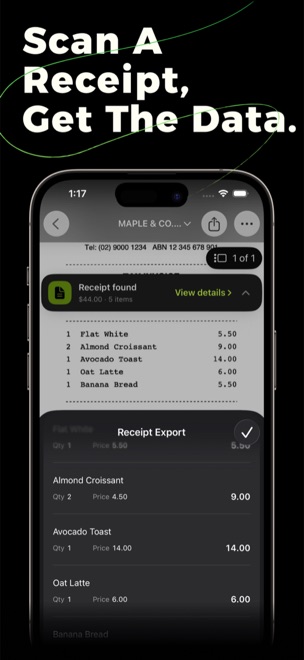
- It read the receipt for me. Right there on the phone, Docusy pulled out the merchant, the date, the total and every line item underneath. I didn’t type a thing.
- A quick glance to check. One total had smudged to almost nothing on the paper. I tapped the field, fixed the single digit, and moved on.
That was it. I did the next one while my coffee was still too hot to drink, then the rest of the pile, one after another — capture, glance, next — faster each time. The stack of curling paper turned into a list on my screen, every row already filled in.
From a pile of paper to a file my accountant could open
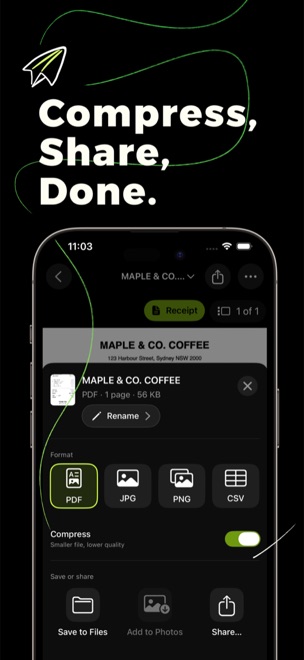
When the glovebox was finally empty, I exported the lot as a CSV — merchant, date and totals in neat columns — and emailed it straight to my accountant. For the receipts I needed to hang on to, I saved a clean, multi-page PDF to Files. The shoebox could finally go in the recycling.
My coffee was still warm. The job I used to lose a whole evening to was done before I’d finished the cup.
Got your own shoebox?
Docusy is free to download on iPhone, iPad & Mac. Next time the receipts pile up, the fix is already in your pocket.