The contract on my desk became a clean PDF before I stood up
A services agreement was sitting on my desk and the only copy was the paper in front of me. Here’s how it became a clean, straight PDF I could file and find later — no scanner, no desktop, no upload.
Anyone who deals with important paperwork knows the small worry that follows. There it was on the wooden desk in front of me: a SERVICES AGREEMENT, with the service provider, the payment terms, a project timeline and the terms and conditions all laid out across the page. One copy, on paper, and I needed a proper digital version before it wandered into a drawer and stayed there.
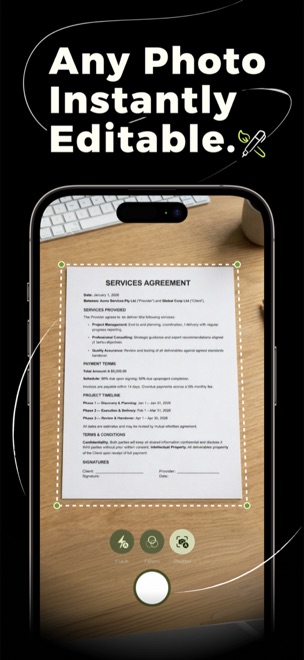
The office scanner was two floors down and reliably jammed. I wasn’t walking that. My keyboard was right there, my phone was in my hand, and I’d put Docusy on it the week before for something else entirely. I held the phone over the page, almost expecting to fight with it — and it had already found the four corners on its own.
Three taps, one clean copy
- Hold it over the page. Docusy snapped bright guides onto all four corners of the agreement against the wooden desk and squared the page up for me. I just tapped capture.
- It straightened and sharpened. The slight angle I’d shot it from was corrected automatically, and the enhance pass cleaned up the lighting so every clause came out crisp and readable.
- On to the next page. The agreement ran longer than one sheet, so I turned the page and captured again. Docusy kept adding them to the same document, in order.
When the last page was in, I had a tidy multi-page document that looked like it came off a proper scanner — straight edges, even tone, sharp text. I saved it as a PDF, named it so I’d actually find it again, and shared a copy on. The paper original went into the folder, but it didn’t matter much anymore.
Got paperwork that needs a clean copy?
Docusy is free to download on iPhone, iPad & Mac. Next time something important is on paper and needs to be on file, the scanner’s already in your pocket.