The contract was due back by five, and the nearest printer was a forty-minute drive away
The services agreement landed in my inbox at lunch, due back signed by five. No printer, no scanner, nowhere to print, sign and rescan. Here’s how the whole thing got signed and sent straight back — without leaving my phone.
Everyone knows the old dance: print the contract, find a pen, sign the last page, then hunt down a scanner to turn paper back into a PDF. I was a couple of towns over for the day, working off my phone, when the agreement came through — three pages of project terms, payment schedule and a signatures block at the bottom, with the client already signed on their line. They wanted it back by close of business.
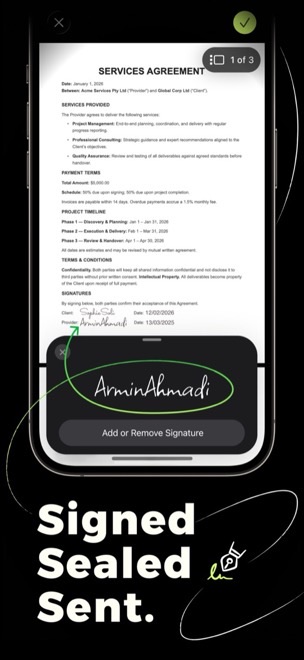
I read it twice on the screen, agreed with all of it, and realised the only thing standing between me and ‘done’ was a printer I didn’t have. Then I remembered Docusy was already on my phone. I opened the PDF in it, scrolled down to the signatures block where the provider line was still waiting, and tapped to sign.
Three taps and it’s signed
- Draw it by hand. I picked a colour, signed my name across the panel with my finger, and there it was in green ink. It looked like my actual signature, not a typed-out font.
- Drop it on the line. I placed the signature on the provider line and added the date beside it. The client had already signed, so now both parties sat on the one page.
- Finalise and check. I scrolled back through all three pages to make sure nothing had shifted, then finalised it into a clean, finished PDF ready to go.
From there it was one tap to send the signed agreement straight back, well before the five o’clock deadline. No printer, no scanner, no forty-minute drive to an office that had both. The contract had gone out as a PDF and come back signed without ever touching paper — signed, sealed, sent, all from a phone on a cafe table.
Something waiting on your signature?
Docusy is free to download on iPhone, iPad & Mac. Next time a contract needs signing and returning, the printer you don’t have is already in your pocket.